Yep, we may get a tiny thank-you (read: commission) when you buy through links on Autologr — not enough for a yacht, but enough to keep the lights (and servers) on. Learn more
Need the real scoop on the Toguard CE41A? See why drivers prefer it after reviewing all 138 specs & performance — especially the camera configuration, front lens field of view, display size & maximum supported storage.
A fast snapshot of the Toguard CE41A, covering its standout specification and what you can expect right out of the box.
Toguard CE41A
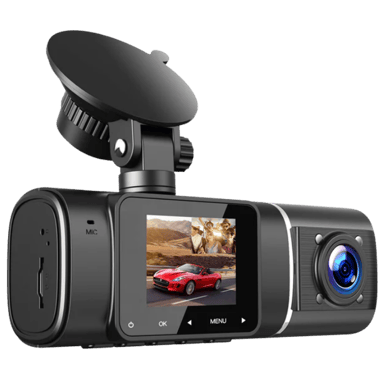
Toguard CE41A is a compact dual-channel dash cam designed to record both the road ahead and the vehicle interior at the same time. It captures Full HD 1080p footage on both cameras, with infrared night vision to improve cabin visibility in low-light conditions. With features like loop recording, motion detection, and parking monitoring, it provides a simple and budget-friendly setup for everyday driving.
Quick Specs Breakdown
The key specs that actually matter—no fluff, no guesswork
Here’s a streamlined view of the Toguard CE41A key specifications. Compare critical features at a glance before exploring the full specs and hands-on insights below.
General Information
Camera Configuration
What camera configuration does it use?
Front + Interior
Device Type
What type of device is this?
Dash Cam
Intended Vehicle Type
What vehicles is it intended for?
Car
Camera & Lens System
Front Lens Field of View
What is the front lens field of view?
170 degree
Lens Aperture
What is the lens aperture?
F/1.8
Lens Element Count
How many lens elements are used?
4-layer Glass
Display & Interface
Display Size
What is the display size?
1.5 inch
Display Type
What type of display does it use?
LCD
Language Support
What languages are supported?
English,Spanish,French,German,Italian
Storage & File Management
Maximum Supported Storage
What is the maximum supported storage?
128 GB
Storage Speed Class Requirement
What storage speed class is required?
Class 10 or U1
File Segmentation Interval
How long is each video segment?
1/3/5 Minutes
Build, Dimensions & Mounting
Cable Length
How long is the cable?
11.5 ft
Mount Type
What type of mount is used?
Suction
Maintenance, Updates & Ownership
Average Lifespan
What is the average lifespan?
3 year
Warranty Length
What is the warranty length?
1 year
Video & Recording Performance
Front Camera Resolution
What is the front camera resolution?
1080p
Interior Camera Resolution
What is the interior camera resolution?
1080p
Video Codec
What video codec is used?
H.264
Safety, Security & Parking Protection
G-Sensor
Does it have a G-sensor?
Yes
Parking Mode Impact Detection
Does it detect impacts in parking mode?
Yes
Parking Mode Motion Detection
Does it detect motion while parked?
Yes
Power, Battery & Charging
Internal Battery Type
What type of internal battery does it use?
Li-ion
Charging Method
How is the dash cam charged?
USB
Connectivity & Smart Features
Video Download via App
Can videos be downloaded via the app?
No
Firmware Update Method
How are firmware updates performed?
SD Card
Specifications & Facts 138
Specs measured. Drama avoided.
We put the Toguard CE41A dash cam to the test. Here’s everything: specs, comparisons with other dash cams, pros, cons, and vote-based reactions from real users.
Dash Cam in this range Who knows? (Help us out by suggesting one!)
Toguard CE41A
The camera configuration is Front + Interior, meaning the system records both the road ahead and the vehicle interior, useful for rideshare monitoring or cabin events.
Indicates how many cameras and viewing angles are supported.
Don’t keep it to yourself — be the first to react and review the Camera Configuration on Toguard CE41A ◉ and help others decide!
Dash Cam in this range Who knows? (Help us out by suggesting one!)
Specifies the types of vehicles the dash cam is designed for.
Don’t keep it to yourself — be the first to react and review the Intended Vehicle Type on Toguard CE41A ◉ and help others decide!
Toguard CE41A Operating Mode
How does the dash cam operate?
0 Toguard CE41A 0 Votes Standalone
Dash Cam in this range Who knows? (Help us out by suggesting one!)
Toguard CE41A
Operating mode is Standalone, meaning the dash cam functions independently without requiring a persistent connection to a phone or cloud service for normal recording.
Describes how the dash cam operates and is managed.
Don’t keep it to yourself — be the first to react and review the Operating Mode on Toguard CE41A ◉ and help others decide!
Toguard CE41A Storage Media Type
What storage media does it use?
0 Toguard CE41A 0 Votes microSD
Dash Cam in this range Who knows? (Help us out by suggesting one!)
Toguard CE41A
Storage uses microSD cards, allowing easy removal and transfer of footage to other devices for review or long-term storage.
Specifies the type of storage media used to record video footage.
Don’t keep it to yourself — be the first to react and review the Storage Media Type on Toguard CE41A ◉ and help others decide!
Dash Cam in this range Who knows? (Help us out by suggesting one!)
Toguard CE41A
Primary recording purposes are Accident Evidence, Security Monitoring, and Driving Records, indicating suitability for incident documentation, vehicle security, and trip logging.
Explains the main reason for recording video footage.
Don’t keep it to yourself — be the first to react and review the Recording Purpose on Toguard CE41A ◉ and help others decide!
Toguard CE41A Legal Compliance Mode
Does it support legal compliance features?
0 Toguard CE41A 0 Votes Audio Recording Toggle, Timestamp Control
Dash Cam in this range Who knows? (Help us out by suggesting one!)
Toguard CE41A
Legal compliance features include Audio Recording Toggle and Timestamp Control, allowing the user to disable audio capture or adjust timestamp settings to meet local privacy and evidentiary requirements.
Supports compliance with local recording and privacy laws.
Don’t keep it to yourself — be the first to react and review the Legal Compliance Mode on Toguard CE41A ◉ and help others decide!
Toguard CE41A Operating Temperature Range
What temperature range does it support?
0 Toguard CE41A 0 Votes 14°F to 140°F
Dash Cam in this range Who knows? (Help us out by suggesting one!)
Toguard CE41A
Operating temperature range is 14°F to 140°F and converts to -10°C to 60°C, so the unit is designed to function across typical automotive temperature extremes.
This range helps ensure reliable performance in both hot summer conditions and cold winter starts.
Defines the temperature range where the dash cam operates reliably.
Don’t keep it to yourself — be the first to react and review the Operating Temperature Range on Toguard CE41A ◉ and help others decide!
Toguard CE41A Mounting Type
How is the dash cam mounted?
0 Toguard CE41A 0 Votes Dashboard
Dash Cam in this range Who knows? (Help us out by suggesting one!)
Describes where and how the dash cam is mounted in the vehicle.
Don’t keep it to yourself — be the first to react and review the Mounting Type on Toguard CE41A ◉ and help others decide!
Toguard CE41A Installation Location
Where is the dash cam installed?
0 Toguard CE41A 0 Votes Front Windshield
Dash Cam in this range Who knows? (Help us out by suggesting one!)
Indicates the physical installation position inside the vehicle.
Don’t keep it to yourself — be the first to react and review the Installation Location on Toguard CE41A ◉ and help others decide!
Toguard CE41A Power Source Type
What is the power source?
0 Toguard CE41A 0 Votes Vehicle Power
Dash Cam in this range Who knows? (Help us out by suggesting one!)
Identifies how the dash cam is powered.
Don’t keep it to yourself — be the first to react and review the Power Source Type on Toguard CE41A ◉ and help others decide!
Toguard CE41A Usage Mode
What is the intended usage mode?
0 Toguard CE41A 0 Votes Personal, Rideshare
Dash Cam in this range Who knows? (Help us out by suggesting one!)
Defines the primary usage scenario for the device.
Don’t keep it to yourself — be the first to react and review the Usage Mode on Toguard CE41A ◉ and help others decide!
Toguard CE41A Target User Type
Who is this dash cam for?
0 Toguard CE41A 0 Votes Daily Driver, Security-Conscious User
Dash Cam in this range Who knows? (Help us out by suggesting one!)
Defines the primary user profile the dash cam is designed for.
Don’t keep it to yourself — be the first to react and review the Target User Type on Toguard CE41A ◉ and help others decide!
Toguard CE41A Release Year
What year was it released?
0 Toguard CE41A 0 Votes 2021
Dash Cam in this range Who knows? (Help us out by suggesting one!)
Indicates the year the product model was released.
Don’t keep it to yourself — be the first to react and review the Release Year on Toguard CE41A ◉ and help others decide!
Toguard CE41A Removable Unit
Is the dash cam removable?
Yes 0Votes Toguard CE41A
Dash Cam in this range Who knows? (Help us out by suggesting one!)
Indicates whether the main unit can be easily removed.
Don’t keep it to yourself — be the first to react and review the Removable Unit on Toguard CE41A ◉ and help others decide!
Toguard CE41A Modular Design
Does it have a modular design?
No 0Votes Toguard CE41A
Dash Cam in this range Who knows? (Help us out by suggesting one!)
Specifies whether components can be added or replaced separately.
Don’t keep it to yourself — be the first to react and review the Modular Design on Toguard CE41A ◉ and help others decide!
Toguard CE41A Weather Resistance Rating
What weather resistance rating does it have?
0 Toguard CE41A 0 Votes Heat Resistant
Dash Cam in this range Who knows? (Help us out by suggesting one!)
Describes the device’s ability to withstand environmental conditions such as heat, cold, or humidity.
Don’t keep it to yourself — be the first to react and review the Weather Resistance Rating on Toguard CE41A ◉ and help others decide!
Toguard CE41A Expandable Storage
Does it support expandable storage?
Yes 0Votes Toguard CE41A
Dash Cam in this range Who knows? (Help us out by suggesting one!)
Indicates whether storage capacity can be expanded.
Don’t keep it to yourself — be the first to react and review the Expandable Storage on Toguard CE41A ◉ and help others decide!
Dash Cam in this range Who knows? (Help us out by suggesting one!)
Toguard CE41A
The front lens offers a wide field of view of 170°, capturing a broad area in front of the vehicle for lane-to-lane coverage and situational awareness.
Indicates how wide the front camera can capture the road.
Don’t keep it to yourself — be the first to react and review the Front Lens Field of View on Toguard CE41A ◉ and help others decide!
Dash Cam in this range Who knows? (Help us out by suggesting one!)
Toguard CE41A
Display diagonal measures 1.5 inch, which is 3.81 cm, offering a small on-device screen suitable for basic preview and menu navigation rather than detailed playback.
Measures the diagonal size of the built-in screen.
Don’t keep it to yourself — be the first to react and review the Display Size on Toguard CE41A ◉ and help others decide!
Dash Cam in this range Who knows? (Help us out by suggesting one!)
Describes how the device receives power.
Don’t keep it to yourself — be the first to react and review the Charging Method on Toguard CE41A ◉ and help others decide!
Toguard CE41A Internal Battery Capacity
What is the internal battery capacity?
0 Toguard CE41A 0 Votes 240
Dash Cam in this range Who knows? (Help us out by suggesting one!)
Toguard CE41A
Internal battery or capacity figure is given as 240; the unit is not specified in the spec so confirm whether this refers to mAh or another metric before inferring runtime.
Indicates the energy capacity of the internal battery.
Don’t keep it to yourself — be the first to react and review the Internal Battery Capacity on Toguard CE41A ◉ and help others decide!
Toguard CE41A Power Input Voltage
What input voltage does it require?
5 Volt 0Votes
Dash Cam in this range Who knows? (Help us out by suggesting one!)
Toguard CE41A
Power input is 5 Volt, which is the common USB supply level and compatible with standard vehicle USB chargers and power adapters.
Defines the voltage required to power the dash cam.
Don’t keep it to yourself — be the first to react and review the Power Input Voltage on Toguard CE41A ◉ and help others decide!
Toguard CE41A Charging While Recording
Can it charge while recording?
Yes 0Votes Toguard CE41A
Dash Cam in this range Who knows? (Help us out by suggesting one!)
Toguard CE41A
Charging while recording is supported, enabling continuous operation during drives when connected to vehicle power.
This allows long trips to be recorded without draining internal backup power.
Allows recording to continue while charging.
Don’t keep it to yourself — be the first to react and review the Charging While Recording on Toguard CE41A ◉ and help others decide!
Toguard CE41A Power Consumption
What is the power consumption?
5 Watt 0Votes
Dash Cam in this range Who knows? (Help us out by suggesting one!)
Toguard CE41A
Power consumption is 5 Watt, a relatively low draw that keeps load on the vehicle power system modest while recording.
Measures how much power the dash cam consumes.
Don’t keep it to yourself — be the first to react and review the Power Consumption on Toguard CE41A ◉ and help others decide!
Toguard CE41A Supercapacitor
Does it support a supercapacitor?
No 0Votes Toguard CE41A
Dash Cam in this range Who knows? (Help us out by suggesting one!)
Indicates support for supercapacitors instead of batteries.
Don’t keep it to yourself — be the first to react and review the Supercapacitor on Toguard CE41A ◉ and help others decide!
Toguard CE41A USB Connector Type
What USB connector type is used?
0 Toguard CE41A 0 Votes Mini-USB
Dash Cam in this range Who knows? (Help us out by suggesting one!)
Specifies the USB port used for power and data.
Don’t keep it to yourself — be the first to react and review the USB Connector Type on Toguard CE41A ◉ and help others decide!
Toguard CE41A Hardwire Kit
Is a hardwire kit supported?
No 0Votes Toguard CE41A
Dash Cam in this range Who knows? (Help us out by suggesting one!)
Indicates compatibility with a dedicated hardwire kit.
Don’t keep it to yourself — be the first to react and review the Hardwire Kit on Toguard CE41A ◉ and help others decide!
Toguard CE41A Cold Start Reliability
Does it start reliably in cold weather?
Yes 0Votes Toguard CE41A
Dash Cam in this range Who knows? (Help us out by suggesting one!)
Ensures reliable startup in cold temperatures.
Don’t keep it to yourself — be the first to react and review the Cold Start Reliability on Toguard CE41A ◉ and help others decide!
Toguard CE41A Heat Resistance Design
Is it designed for heat resistance?
Yes 0Votes Toguard CE41A
Dash Cam in this range Who knows? (Help us out by suggesting one!)
Designed to withstand high in-vehicle temperatures.
Don’t keep it to yourself — be the first to react and review the Heat Resistance Design on Toguard CE41A ◉ and help others decide!
Toguard CE41A Auto Power On
Does it power on automatically?
Yes 0Votes Toguard CE41A
Dash Cam in this range Who knows? (Help us out by suggesting one!)
Automatically turns on with vehicle ignition.
Don’t keep it to yourself — be the first to react and review the Auto Power On on Toguard CE41A ◉ and help others decide!
Toguard CE41A Auto Power Off
Does it power off automatically?
Yes 0Votes Toguard CE41A
Dash Cam in this range Who knows? (Help us out by suggesting one!)
Automatically shuts down when the vehicle is off.
Don’t keep it to yourself — be the first to react and review the Auto Power Off on Toguard CE41A ◉ and help others decide!
Toguard CE41A Backup Power Duration
How long does backup power last?
0 Toguard CE41A 0 Votes 1-3 Minutes
Dash Cam in this range Who knows? (Help us out by suggesting one!)
Indicates how long backup power lasts after shutdown.
Don’t keep it to yourself — be the first to react and review the Backup Power Duration on Toguard CE41A ◉ and help others decide!
Dash Cam in this range Who knows? (Help us out by suggesting one!)
Indicates the duration of the manufacturer warranty.
Don’t keep it to yourself — be the first to react and review the Warranty Length on Toguard CE41A ◉ and help others decide!
Toguard CE41A Firmware Update Frequency
How often are firmware updates provided?
0 Toguard CE41A 0 Votes Rare
Dash Cam in this range Who knows? (Help us out by suggesting one!)
Toguard CE41A
Firmware updates are expected Rarely, indicating the manufacturer provides infrequent updates or that the device firmware is mature and stable.
Describes how frequently firmware updates are released by the manufacturer.
Don’t keep it to yourself — be the first to react and review the Firmware Update Frequency on Toguard CE41A ◉ and help others decide!
Toguard CE41A Maintenance Requirement
What maintenance is required?
0 Toguard CE41A 0 Votes Low
Dash Cam in this range Who knows? (Help us out by suggesting one!)
Toguard CE41A
Maintenance needs are rated Low, meaning the device generally requires minimal routine care such as occasional cleaning and periodic firmware updates.
Describes the level of routine maintenance required to keep the dash cam functioning properly.
Don’t keep it to yourself — be the first to react and review the Maintenance Requirement on Toguard CE41A ◉ and help others decide!
Toguard CE41A Cleaning Requirement
How does it need to be cleaned?
0 Toguard CE41A 0 Votes Wipe Lens Regularly
Dash Cam in this range Who knows? (Help us out by suggesting one!)
Toguard CE41A
Recommended cleaning practice is Wipe Lens Regularly, which maintains image clarity by removing dust, fingerprints, and smudges that degrade footage quality.
Indicates how often and how the device should be cleaned for optimal performance.
Don’t keep it to yourself — be the first to react and review the Cleaning Requirement on Toguard CE41A ◉ and help others decide!
Toguard CE41A Update Delivery Method
How are updates delivered?
0 Toguard CE41A 0 Votes SD Card
Dash Cam in this range Who knows? (Help us out by suggesting one!)
Specifies how firmware updates are delivered.
Don’t keep it to yourself — be the first to react and review the Update Delivery Method on Toguard CE41A ◉ and help others decide!
Toguard CE41A Operating Noise Level
How loud is the dash cam?
0 dB 0Votes
Dash Cam in this range Who knows? (Help us out by suggesting one!)
Measures any operational noise produced during use.
Don’t keep it to yourself — be the first to react and review the Operating Noise Level on Toguard CE41A ◉ and help others decide!
Toguard CE41A Customer Support Channels
What support channels are available?
0 Toguard CE41A 0 Votes Email
Dash Cam in this range Who knows? (Help us out by suggesting one!)
Lists available customer support methods.
Don’t keep it to yourself — be the first to react and review the Customer Support Channels on Toguard CE41A ◉ and help others decide!
Toguard CE41A Subscription Requirement
Is a subscription required?
No 0Votes Toguard CE41A
Dash Cam in this range Who knows? (Help us out by suggesting one!)
Indicates whether a paid subscription is required.
Don’t keep it to yourself — be the first to react and review the Subscription Requirement on Toguard CE41A ◉ and help others decide!
Toguard CE41A Replacement Parts Availability
Are replacement parts available?
No 0Votes Toguard CE41A
Dash Cam in this range Who knows? (Help us out by suggesting one!)
Indicates availability of official replacement parts.
Don’t keep it to yourself — be the first to react and review the Replacement Parts Availability on Toguard CE41A ◉ and help others decide!
Surveys
Because hot takes deserve votes.
Toguard CE41A Video Recording Quality
How satisfied are you with the video clarity and detail captured by this dash cam during daytime and nighttime driving?
Outstanding clarity — 4K resolution with clear night footage 0Votes
Very clear — 1440p resolution with good night visibility 0Votes
Good enough — 1080p resolution with acceptable night footage 0Votes
Below average — 1080p with noticeable blur or noise at night 0Votes
Hard to rely on — Below 1080p with poor detail 0Votes
Toguard CE41A Field of View Coverage
How well does this dash cam capture the road area in front of the vehicle?
Covers everything — 160 to 180 degrees 0Votes
Very wide view — 140 to 159 degrees 0Votes
Decent coverage — 120 to 139 degrees 0Votes
Limited view — 100 to 119 degrees 0Votes
Too narrow — Under 100 degrees 0Votes
Toguard CE41A Night Recording Performance
How effective is this dash cam at recording clear footage in low light or nighttime conditions?
Excellent night capture — Clear details up to 50 feet 0Votes
Very good visibility — Clear details up to 35 to 50 feet 0Votes
Acceptable — Clear details up to 20 to 35 feet 0Votes
Struggles in the dark — Clear details under 20 feet 0Votes
Barely usable — Night footage often unclear 0Votes
Toguard CE41A Ease of Setup and Installation
How easy is it to install and start using this dash cam for the first time?
Super easy — Ready to use in under 10 minutes 0Votes
Pretty simple — Setup takes 10 to 20 minutes 0Votes
Manageable — Setup takes 20 to 40 minutes 0Votes
A bit frustrating — Setup takes 40 to 60 minutes 0Votes
Painful setup — Takes over 1 hour or needs help 0Votes
Toguard CE41A App and Software Experience
How smooth and user friendly is the app or software used with this dash cam?
Smooth and intuitive — Easy navigation and quick access 0Votes
Mostly smooth — Minor hiccups but easy to use 0Votes
Average experience — Usable but not very polished 0Votes
Clunky — Slow or confusing at times 0Votes
Hard to use — Buggy or unreliable 0Votes
Toguard CE41A Reliability and Durability
How reliable does this dash cam feel during daily driving over time?
Rock solid — Works reliably for over 5 years 0Votes
Very reliable — Expected lifespan of 3 to 5 years 0Votes
Decent reliability — Lasts around 2 to 3 years 0Votes
Some concerns — Issues appear within 1 to 2 years 0Votes
Unreliable — Problems within the first year 0Votes
Toguard CE41A Power and Heat Management
How well does this dash cam handle heat and power during long drives?
Stays cool — Runs smoothly for 6+ hours 0Votes
Handles heat well — Stable for 4 to 6 hours 0Votes
Acceptable — Stable for 2 to 4 hours 0Votes
Gets warm — Issues after 1 to 2 hours 0Votes
Overheats — Problems under 1 hour 0Votes
Toguard CE41A Storage and Loop Recording
How well does this dash cam manage video storage and loop recording?
Excellent handling — Supports up to 512 GB smoothly 0Votes
Very good — Supports up to 256 GB reliably 0Votes
Good enough — Supports up to 128 GB 0Votes
Limited — Supports up to 64 GB 0Votes
Too limited — Under 64 GB support 0Votes
Toguard CE41A Design and Build Appeal
How appealing and discreet is the design of this dash cam inside the car?
Sleek and discreet — Barely noticeable 0Votes
Clean look — Fits well with most interiors 0Votes
Average design — Looks fine but noticeable 0Votes
Bulky — Stands out too much 0Votes
Ugly and distracting — Ruins interior look 0Votes
Toguard CE41A Overall Ease of Daily Use
How convenient is this dash cam to use during everyday driving?
 Supermod
  Moderator